

Apple CarPlay is a safe, hands-free way to access your iPhone apps while driving. With Apple CarPlay, you can use your phone to make calls, send messages, and listen to music. But sometimes Apple CarPlay keeps disconnecting , won't open properly, or you can't hear anything when CarPlay is connected. It can be really annoying to sit in your car for hours trying to figure out why your wireless CarPlay isn't working. But you don't have to worry too much. In this article, we'll look at what causes the Apple CarPlay not working problem and how to fix it.
Make sure your country (region), phone, and car support Apple CarPlay
You need to confirm that your country (region), phone, and car support Apple CarPlay.
-
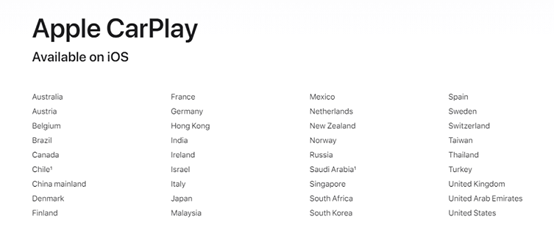
The following image lists which countries and regions are supported by CarPlay
- Apple 5 with iOS 9 or later and above
- List of 2022 Cars That Offer Wireless CarPlay
Which Cars Offer Wireless CarPlay for 2024:
- Acura: MDX, RDX,
- Audi: A3, A4, A5, A6, A7, A8, E-Tron, E-Tron GT, Q3, Q5, Q7, Q8
- BMW: 2 Series, 3 Series, 4 Series, 5 Series, 7 Series, 8 Series, iX, i4, X3, X4, X5, X6, X7, Z4, X1, X2
- Buick: Enclave, Encore GX, Envision
- Cadillac: CT4, CT5, Escalade/Escalade ESV, XT4, XT5, XT6
- Chevrolet: Blazer, Bolt EV, Bolt EUV, Camaro, Corvette, Equinox, Malibu, Silverado 1500, Silverado 1500 LTD, Silverado 2500/3500, Suburban/Tahoe, Trailblazer, Traverse
- Chrysler: Pacifica
- Dodge: Durango
- Ford: Bronco, Edge, E-Transit, Expedition/Expedition Max, F-150, F-150 Lightning, Mustang Mach-E
- GMC: Acadia, Hummer EV, Sierra 1500, Sierra 1500 LTD, Terrain, Yukon/Yukon XL
- Honda: Accord, Civic
- Hyundai: Accent, Elantra, Ioniq (excludes Ioniq 5), Kona, Kona EV, Palisade, Santa Cruz, Santa Fe, Sonata, Tucson, Venue
- Infiniti: Q50, Q60, QX50, QX55, QX60, QX80
- Jeep: Compass, Grand Cherokee/Grand Cherokee L, Wagoneer/Grand Wagoneer
- Kia: Carnival, Forte, K5, Niro, Rio, Sorento
- Lincoln: Navigator, Nautilus
- Maserati: Ghibli, Levante, MC20, Quattroporte
- Nissan: Armada, Pathfinder, Rogue
- Porsche: 911, Cayenne, Panamera, Taycan, Macan
- Ram: 1500, 2500/3500, ProMaster
- Toyota: Tundra, Supra
- Volkswagen: Arteon, Atlas/Atlas Cross Sport, Golf GTI/Golf R, ID.4, Jetta, Taos, Tiguan
Please note that not all manufacturers' vehicles support wireless CarPlay, and support may vary depending on the specific configuration of the model you purchase. There may be omissions here; please call your local dealer for details.
Keep Wi-Fi and Bluetooth turned on
Make sure you have Wi-Fi and Bluetooth turned on on your iPhone. Also, check if you have Airplane Mode turned on, which prevents your phone from making any wireless connections.
Apple CarPlay is limited
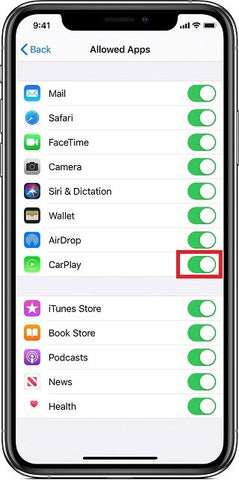
If CarPlay isn't detecting your iPhone, you need to make sure CarPlay isn't restricted on your phone. On your iPhone, go to Settings > Screen Time > Content & Privacy Restrictions and tap Allowed Apps to enable CarPlay.
CarPlay connection is blocked
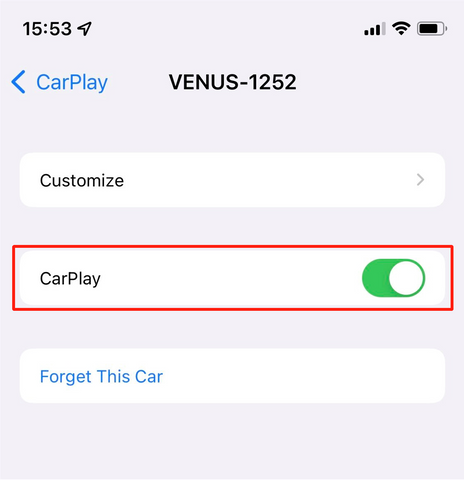
Another problem with wireless CarPlay not working could be that the CarPlay connection is blocked. If it's blocked, CarPlay won't activate. You can fix this by going to Settings > General > CarPlay, selecting your car from the connection list > Activate CarPlay.
Reboot and update
Restarting and updating your device may fix connection issues.
- Restart your iPhone and Head-Unit
- Update your iPhone


