

The best Apple CarPlay display of 2024 stands out for its elegant design and intuitive interface, offering seamless integration with your Apple devices for a superior driving experience.
Which Apple CarPlay screen is best?
The improved Apple CarPlay display of 2024 isn't just a display, it's your gateway to a seamless driving experience. Combining cutting-edge technology, intuitive design, and safety features, it enhances your journey on the road. With high-definition clarity, responsive touch controls, and seamless iPhone integration, it transforms your vehicle into a connected productivity and entertainment hub.
How to choose the best Apple CarPlay display?
When selecting the best Apple CarPlay display for your vehicle, there are several factors to consider:
1. Compatibility: Make sure the CarPlay screen is compatible with your vehicle make and model, as well as your iPhone model.
2. Display Quality: Look for a screen with high-definition resolution and vibrant colors for optimal visibility and clarity.
3. Responsiveness: Choose a CarPlay screen with advanced touch sensitivity for smooth and intuitive interaction with apps and features.
4. Safety Features: Prioritize screens that offer hands-free functionality and voice commands to minimize distractions while driving.
5. Future Compatibility: Consider displays that offer seamless integration with future Apple technologies and software updates to protect your investment over time.
Considering these factors, you can select the best Apple CarPlay screen that meets your specific needs and preferences.
Top 3 Picks for the Best Apple CarPlay Display
1. CarPlay V30S screen :

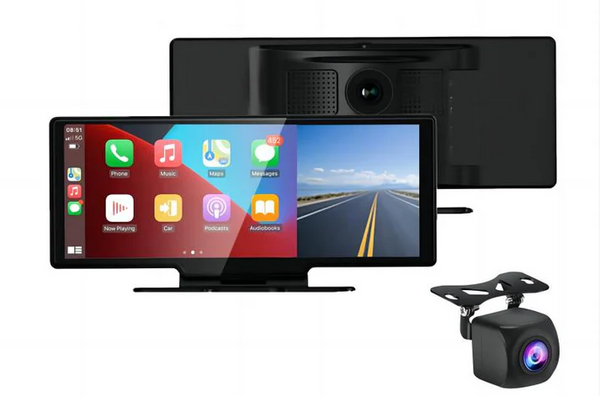
With a commanding display, lightning-fast responsiveness, and advanced safety features, the V30S tops our list for Best Apple CarPlay Display 2024, seamlessly integrating with Apple’s latest technologies for a future-ready driving experience.
2. CarPlay V30 screen :
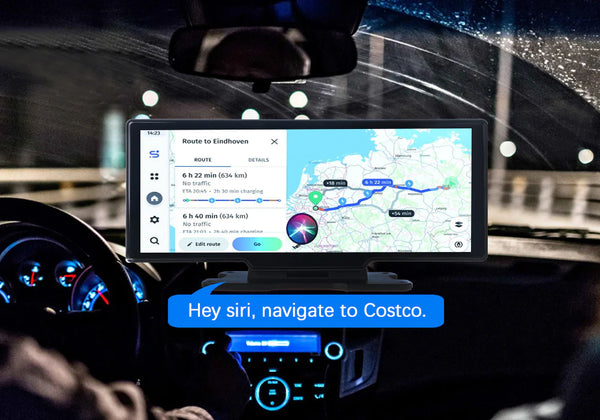
Offering unmatched clarity and customizable layouts, the V30 is another excellent choice for the Best Apple CarPlay Display, elevating the driving experience with its intuitive interface and personalized settings.
3. Portable CarPlay Screen Dashcam D1026 :

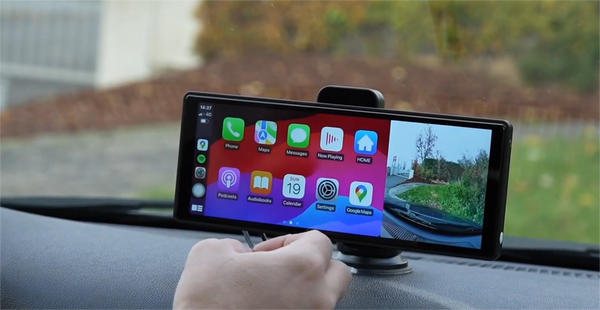
Rounding out our top three picks is the D1026 CarPlay Dashcam Display, known for its exceptional display quality and innovative features. Its commitment to safety and adaptability to future innovations make it a worthy contender for Best Apple CarPlay Display 2024.
Conclusion
Ultimately, selecting the best Apple CarPlay display for 2024 involves considering compatibility, display quality, responsiveness, safety features, and future-proofing. Explore our guide and three top picks to find a CarPlay display that enhances your driving experience and keeps you connected on the road.
Frequently Asked Questions about Apple CarPlay Displays
Here are some frequently asked questions about Apple CarPlay displays.
1. How do I connect my iPhone to Apple CarPlay?
Connect your iPhone to your car's USB port using a Lightning cable. The CarPlay interface should appear on your car's screen.
2. What features and apps does Apple CarPlay offer?
Access navigation, music, messaging, calls, and select third-party apps.
3. Can I use voice commands with Apple CarPlay?
Yes, use Siri for hands-free control by pressing the voice control button or tapping the Siri icon.
4. Will the portable CarPlay screen get hot?
Adequate ventilation and following the manufacturer's guidelines can prevent overheating problems.
5. Do dashcams damage the battery?
Dashcams typically draw power from the car battery, but usually have minimal impact when the car is running.
6. What is the reception distance of the Wifi transmission?
WiFi transmission distance varies, but typically reaches up to 30 meters.
7. What is the capacity of the TF (microSD) card for video files?
TF (microSD) card capacity varies, typically supporting up to 128GB or more.
8. What to do if the dashcam player volume is low?
Adjust the volume settings or check the audio cable connections.
9. Inconsistent with the actual time of the video, what's happening?
Make sure you use appropriate video playback software, as some may display incorrect timestamps.


